bizmap export
Requires bizmap 0.5.0+; the reading layout (domains, call trees, screens) since 0.6.0; API docs since 0.7.0; the start screen since 0.14.0.
bizmap scan . --out bizmap.graph.json            # or a --discover / registry-merged graph
bizmap export --graph bizmap.graph.json --format html --out bizmap.html
bizmap export --format html --lang pt-BR         # page in Brazilian Portuguese
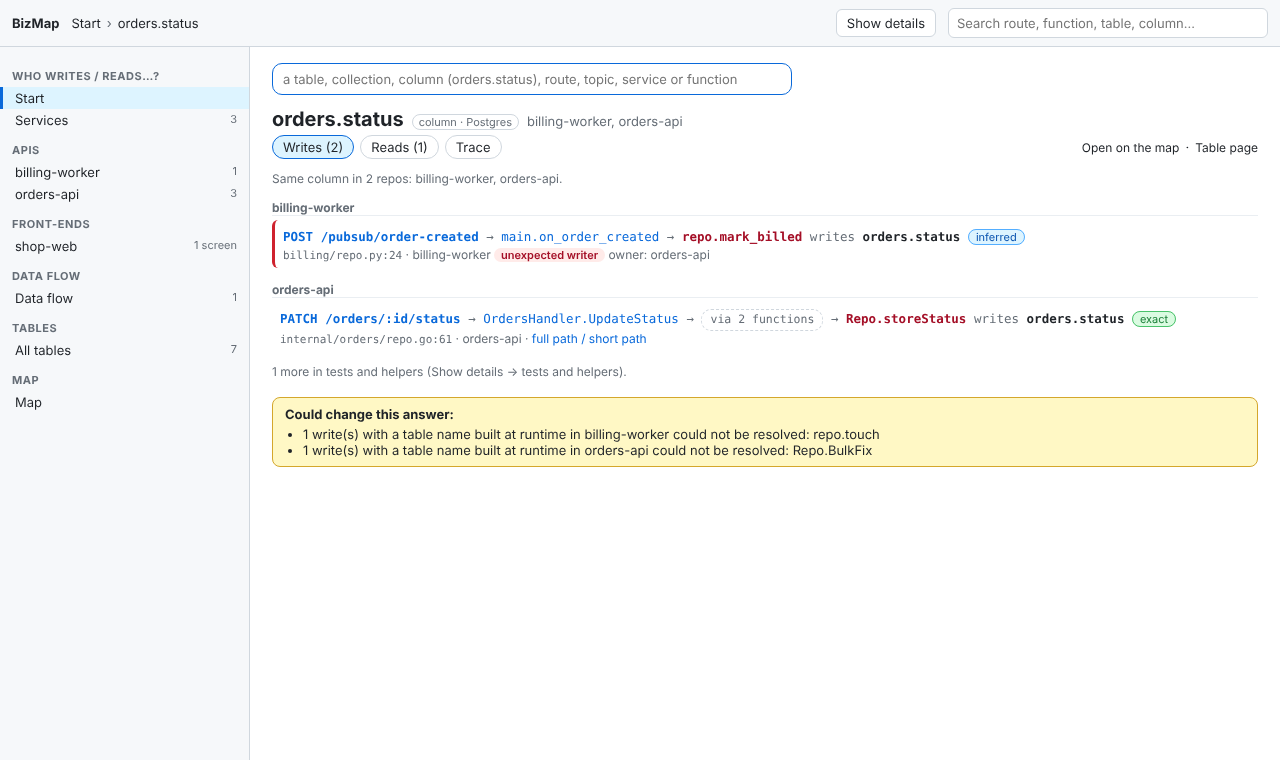
The page opens on the question first — who writes / reads X? — with a summary strip, findings cards, a services × tables matrix and a map around one entity: see the start screen. The architecture view (services ↔ stores ↔ topics) and the flow of each queue / trigger are in architecture and queues.
--format html writes one self-contained file: the graph and every library
are inside it. It opens with a double click, works offline, and can be attached
to an e-mail or a ticket. Nothing is fetched from a CDN or a server.
--format mermaid writes Markdown with the architecture and every queue /
trigger flow as Mermaid diagrams GitHub renders (default bizmap-architecture.md):
see architecture and queues.
--format llm (a compact text overview for an AI assistant) is not available yet.
API docs: what each route receives and returns
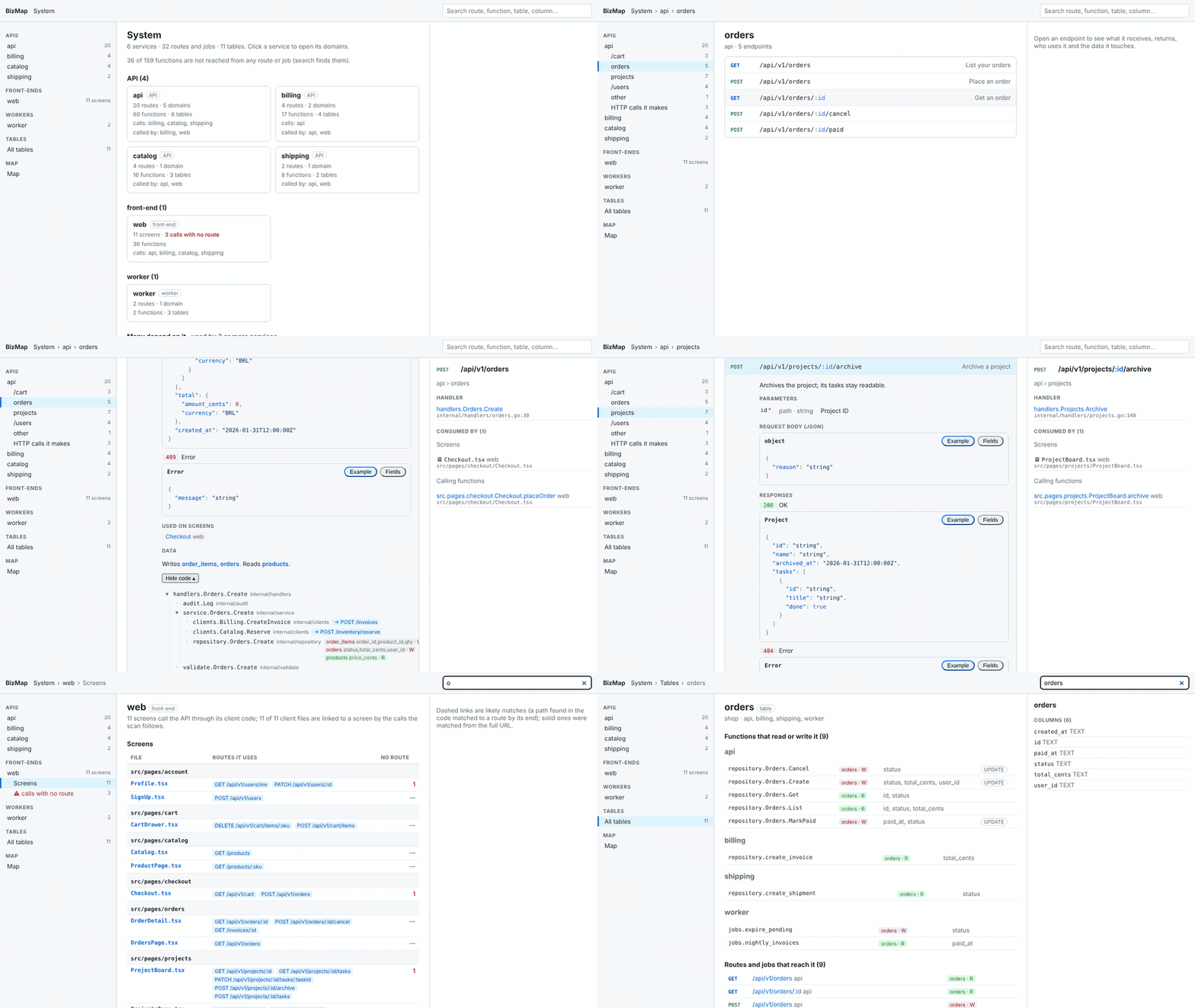
A domain page reads like Swagger / Redoc: one line per endpoint (method, path, summary). Open one to see its description, parameters, the JSON request body, each response with its JSON, the screens that use it, the data it reads and writes in one sentence, and — only if you ask — See in code (the call tree).
The docs come from, best first:
-
An OpenAPI / Swagger file:
swag init'sdocs/swagger.json, FastAPI'sopenapi.json(Swagger 2.0 or OpenAPI 3, JSON or YAML). It brings the fields of every request and response.bizmap exportfinds it next to each repo —<repo>/docs/swagger.json,<repo>/docs/openapi.json,<repo>/openapi.json,<repo>/swagger.json,<repo>/api/openapi.json(or.yaml) under the current directory, else every spec in the repo'sopenapi/,docs/,api/,spec/orspecs/folder (one per area). The repo folder is the graph'srepo_rootsentry when it has one, else the service name. A spec found this way that cannot be read is skipped with a note;bizmap exportprints the specs it used (API docs: 2 specs (…)). Or give them explicitly (repeatable; a bad file or an unknown service is then an error):
When the spec has no description, the handler's comment or docstring is used (FastAPI's automatic summary comes from the function name; the docstring has the text). Query parameters show their enum and default.
- swag comments above a Go handler (
@Summary,@Description,@Tags,@Param,@Success,@Failure,@Router) — already in the graph. They give the summary, parameters and the names of the request and response types; their fields need the spec file. - The handler's comment: its first sentence becomes the summary.
Routes are matched by method and path ({id}, :id and <id> alike), with the
spec's base path (basePath, servers[0].url). Domains follow the API's own
tags (@Tags, OpenAPI tags); routes without docs join the tag named
like the first matching segment of their path (/api/v1/products/:id →
products), and a tag with more than 80 routes is split into sections
(client · delivery).
Reading the page
The page reads the system like a book: overview first, detail on click. It never draws the whole graph.
| Level | What you see |
|---|---|
| System | One card per service: API, front-end, worker or library, with routes, domains, tables, who it calls and who calls it. "Many depend on it": services and tables used by 3 or more services. |
| Service | Its domains: routes grouped by path (/projects, /projects/tasks…), with how many routes and functions, the tables they read and write, and how many callers use them. Then, for any service: its screens (front-ends), the tables it reads and writes itself, and its code by folder (functions, HTTP calls, tables) — for a library or a client with no routes, that is its whole page. A folder opens the list of its functions. |
| Domain | The endpoints, like API docs: method, path, summary; open one for parameters, request and response JSON, screens that use it and its data (see above). |
| Route (See in code) | Its call tree: the handler, the functions it calls, and so on, one line per function with its folder and the tables (and columns) it reads (R) or writes (W). Each node opens on click; a function already shown, or one that calls back into the path, is marked instead of repeated. |
| Data | A table's page: columns and types, the functions that read or write it (by service, with columns and SQL operations), and the routes and jobs that reach it. When data is copied between tables (feeds), a Data flow section: a diagram source → function → this table → function → destination (at most 30 boxes, +N for the rest), the column correspondence (source.column → destination.column, function, confidence) both ways, and the same diagram as Mermaid text to copy. |
The right panel shows what you clicked: file:line, the comment above the
function (why), parameters, what it calls and who calls it, the tables it
reads and writes itself and through the functions it calls, its HTTP calls, and
— for a route — who consumes it (front-end screens and other services).
Parameters come from the route path (:id, {id}, <id>, [id]). When the
graph has params / returns on a function, the panel shows them too.
Front-ends and API calls
A service whose code is mostly TS/JS/Vue/Svelte and that calls APIs
(calls_http or unresolved_http) is listed as a front-end when it has UI
files (.tsx, .jsx, .vue, .svelte, a pages/, screens/ or
components/ folder) or no routes of its own — a Vite app made of .ts
files counts.
- Screens are the UI files that reach an API call through the calls the scan follows: a page → a hook → the API client → the route. Each screen lists the routes it uses and the client functions it goes through. In a front-end with no UI files, the files that make the calls are the screens.
- API client code lists the files whose functions call an API (the client
layer) — for every service, not only front-ends — with the routes each one
reaches and the screens that use it. A client file with no screen linked is
usually called through a function reference (a hook's
queryFn), which the call graph does not follow. - Calls with no route lists the calls that matched no scanned route
(
unresolved_http), for every service, by reason, with what each reason means. - API routes it uses (on a front-end, or any service that calls an API): every route of the scanned APIs its code calls, by API and domain, with the summary and the screens (or client files) that call it.
- Each API route lists who consumes it: the screens first, then the calling functions.
- Links matched by heuristic (a path found in the code matched to a route by its end) are dashed and marked likely; links from a full URL are solid.
- Tests, mocks, fixtures, type declarations (
.d.ts) and generated code (generated/) call APIs too, but they are not who uses a route: they are left out of screens, client code, consumers and counts, and the page says how many calls it left out.
Search (top right) finds routes, functions, tables and columns; links can be
shared (#/r/…, #/t/…) and the back button works. Map keeps the service
graph (services and the HTTP links between them).
Domains
Routes are grouped by the first useful path segment. Skipped: generic segments
(api, v1, v2…, rest, public, internal, graphql, rpc), path
parameters, a prefix every route of the service shares, and a first segment
at least 70% of the routes share (/svc/…). A group that is
too large (more than 80 routes, or more than 35% of a service with over 30
routes) is split by the next segment into sections (/projects/tasks); a
section with fewer than 3 routes stays in its parent. Groups with fewer than 3
routes go to other. A service with 12 routes or fewer has a single domain.
Jobs, workers, tasks and events are grouped by kind.
Fix or rename groups in bizmap.yaml (read from --config, else
./bizmap.yaml; only bizmap export reads export:):
export:
  domains_by: path                  # or `folder`: group by the handler's directory
  domains:
    api:                            # service name; "*" applies to every service
      projects: [/projects, /v2/projects]
      billing: [/invoices, "folder:internal/billing/"]
Rules from bizmap.yaml are applied first (longest prefix wins); the rest is
grouped automatically. API tags (above) come before automatic grouping.
Services
A service is a repository by default: the repo/ prefix of ids in a
merged or joint graph, else the graph's repo. Tables of a shared database:
belong to no service, so several services can point at the same table.
A monorepo can be split into several services:
export:
  services:
    orders: [services/orders/, libs/orders/]
    billing: services/billing/
    admin: "api:cmd/admin/"     # in a multi-repo graph: only in repo `api`
A node whose evidence file starts with one of the prefixes goes to that service (longest prefix wins); everything else stays in its repo.
Large graphs
Only a small index is read when the page opens. Each domain, front-end, batch of tables and folder of unreached functions is a separate JSON block in the same file, read the first time it is opened; search reads the name list on the first keystroke. Derived (call-propagated) data edges are not shipped: the page recomputes them from the call tree.
On a synthetic graph shaped like a 16-repo --discover (107k nodes, 628k
edges), measured in headless Chrome: a 31 MB file generated in about 4 s, an
index of about 0.3 MB, the page ready in about 0.4 s, and every level (service,
domain, route tree, function, table, screens) opened in under 100 ms.
pytest -m perf regenerates that graph and checks the generation time, the
index size and the largest block.
Try it on the fictional example (its api/openapi.json is found next to it):
What the page is made of
| Part | What | License |
|---|---|---|
| Cytoscape.js 3.34.1 | the service map (inlined, minified) | MIT (notice kept at the top of the inlined file) |
| Mermaid 11.16.1 | the architecture, queue-flow and map diagrams (inlined, minified; <!-- written <\!--, which JavaScript reads the same, so it can sit in a <script>) |
MIT (vendor/mermaid.LICENSE) |
export/book.js |
BizMap's own plain JavaScript: no framework, no build step | MIT (BizMap) |
export/template.html |
the page and its CSS | MIT (BizMap) |
bizmap export fills the template with these files and the graph data. No
Python dependency is added and nothing is downloaded when the page is
generated or opened.
The reading layout
Below the start screen, the page reads the system like a book: services, domains, a route's call tree, and the screens of each front-end.