bizmap export: architecture and queue flows
Unreleased.
The map and trace answer questions about one entity. These two views explain
the whole system at a glance: how services connect to stores and queues, and
how each queue works end to end.
bizmap export --graph bizmap.graph.json --format html --out bizmap.html   # #/architecture, #/queues, #/topic/<name>
bizmap export --graph bizmap.graph.json --format mermaid                  # bizmap-architecture.md, for GitHub
bizmap report --graph bizmap.graph.json --mermaid                         # the report, then the same diagrams
The screenshots use the fictional workspace from the tests
(tests/fixtures/arch_demo.py):
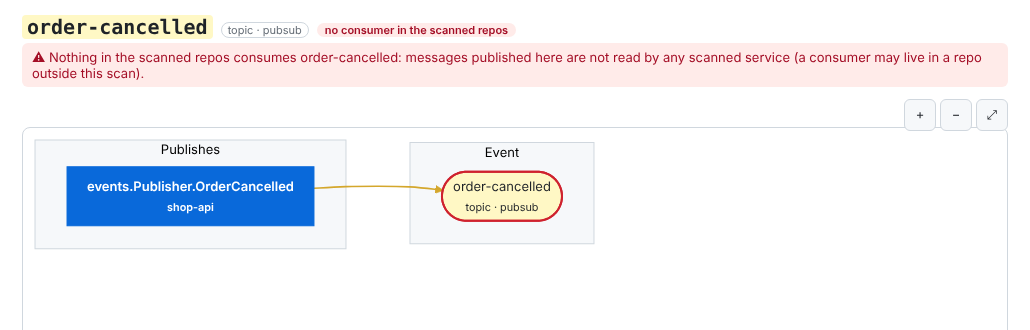
shop-api: Go, Postgresorders,customersandorder_items. It publishesorder-placedandorder-cancelled.shop-web: TS, callsshop-apiover HTTP.billing-worker: Python. It consumesorder-placedand writesinvoices(Postgres) andpayment_events(Firestore).notify-fn: a Cloud Function triggered bypayment_events. It writesnotifications.
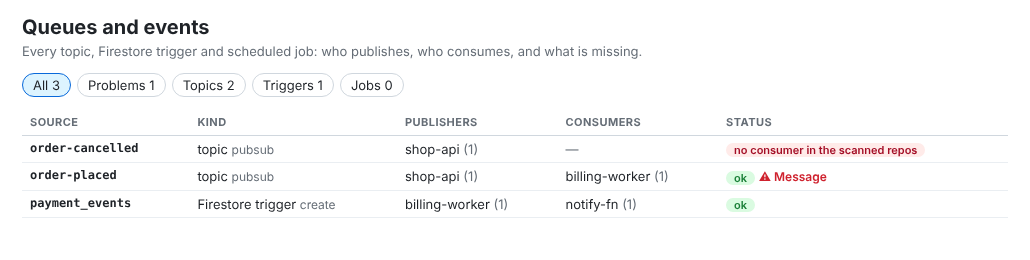
Nothing consumes order-cancelled.
Architecture (#/architecture)
Find it in the side menu or in the Architecture card on the start screen.
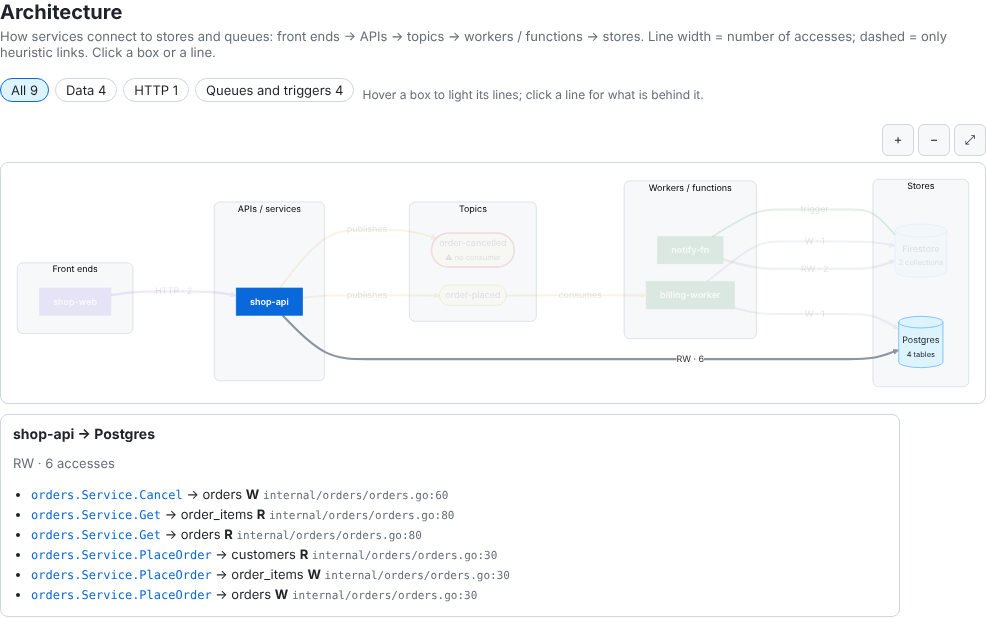
- Columns, left to right: front ends → APIs / services → topics → workers / functions → stores. A service's column comes from what it exposes, with the side menu's rule (the HTML and the Mermaid output use the same one):
- a JS/TS code base that calls APIs is a front end when it has UI files or no routes of its own;
- otherwise, HTTP routes (
httpentrypoints) make it an API; - otherwise, any other entrypoint (consumer, trigger, job, HTTP or callable Cloud Function) makes it a worker.
The side menu, the HTML architecture and the Mermaid output call the same
function (classify_service), so they always agree.
- Functions inside a front end or an API: Cloud Functions with a trigger,
queue consumers and jobs living in the same repo as screens or routes get a
box of their own in the workers column, <service> · functions (e.g.
shop-web · functions, with the trigger on order_events), together with
what they run. The screens stay in the front-end column. A front end's HTTP
Cloud Functions go there too, since a front end serves no routes. A
background loop (a Go goroutine the scan marks scheduled_job with no
schedule) stays with its service: it is part of that process, not an event.
- Stores, not tables: each store (Postgres, Firestore, SQL Server…) is a
single box that shows its number of tables / collections. Click it to list
them with a filter.
- Lines are aggregated per pair:
- service → store, labelled R, W or RW;
- service → topic (publishes);
- topic → consumer;
- front end → API (HTTP);
- store → function, for a Firestore trigger.
Each line shows the number of accesses behind it, and its width grows with
that number. A line is dashed when every link behind it is heuristic,
as elsewhere in the page.
- Hover a box to light its lines; everything else fades.
- Click a line (its label) to see the functions behind it
(orders.Service.PlaceOrder → orders W, with file:line), each linking to
its page.
- Click a box to see a service's links. A topic box opens its flow.
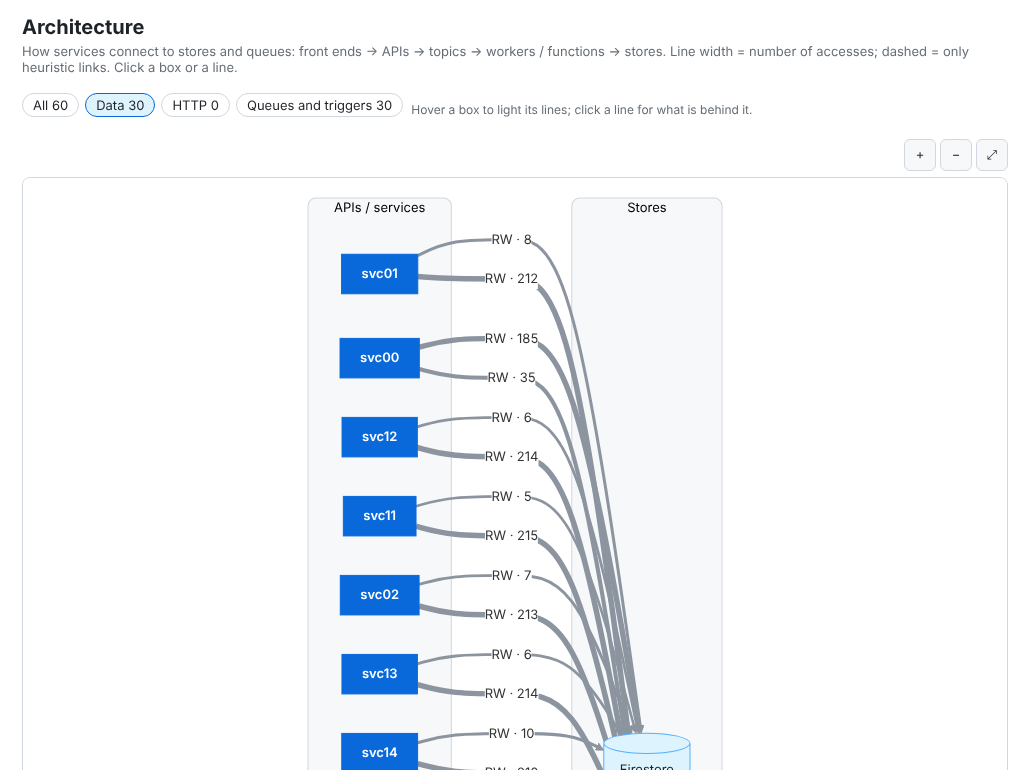
- One layer at a time: the tabs All, Data, HTTP and Queues and
triggers (with their line counts) draw one kind of line at a time. A big
system (more than 45 lines) opens on Data; a small one on All.
- Topics folded per publisher: when one service is the only publisher of
3 or more topics, they are one box (shop-api · 4 topics, with how many
have no consumer). Click it, or show its topics one by one in the
service's panel, to open it.
- Drawn by Mermaid, the renderer GitHub uses for the PR comment: columns
as frames, curved lines that avoid the boxes. Mermaid 11 is embedded in the
page (no network). The same graph gives the same drawing. Use + / − / fit to
zoom; a wide drawing scrolls sideways.
With about 15 services and 800 tables the drawing still has one box per service, topic and store.
Queues and events (#/queues)
Every event source is listed with its publishers, consumers and a status: ok, no consumer in the scanned repos or no publisher in the scanned repos. A ⚠ Message tag means the consumer reads a field no publisher sends. The sources are:
- topics and queues (Pub/Sub, Celery, RQ…);
- Firestore triggers: the collection is the source and the code that writes it is the publisher;
- scheduled jobs: those with a schedule. A loop started at boot is not one.
A queue the scan created for a Firestore trigger (kind: firestore) is
listed as that trigger, not as a topic. Two topics with the same name in
different repos (for example cloud-tasks) show their repo:
cloud-tasks (worker-a).
One flow (#/topic/<name>)
The flow reads left to right:
- what the publisher reads (the data reached by the route or job that calls it);
- the publishing function and its service;
- the topic;
- the consumers;
- what they write;
- then the next events, up to 3 hops: a Firestore trigger on a collection
the consumer writes (
payment_events → notify-fn → notifications), or a topic the consumer publishes to.
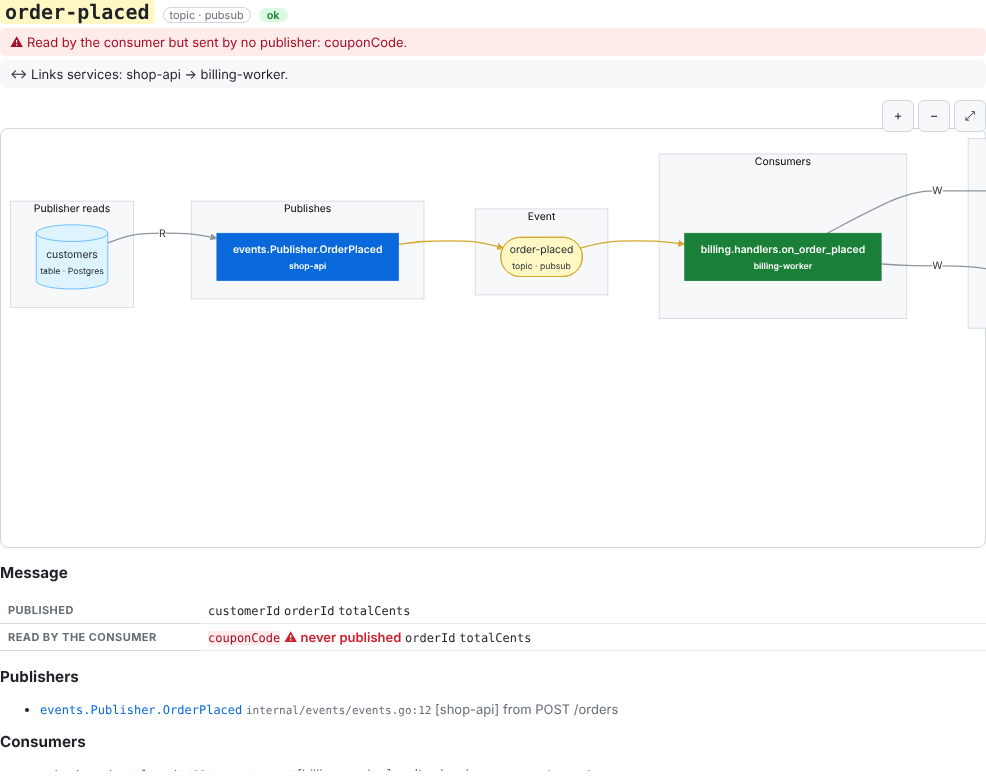
- Message: when the scan saw them, the fields the publisher sends and the
fields the consumer reads (
dataflow_in). A field that is read but never published is flagged:couponCodeabove. - Warnings:
- no consumer in the scanned repos: nothing scanned reads the topic. A consumer may live in a repo outside the scan, so this is a gap in what was scanned, not necessarily a bug;
- no publisher: nothing in the scanned repos sends to it (for a Firestore trigger, nothing writes the collection);
- links services: publisher and consumer live in different services.
#/topic/<name> takes the topic name, firestore:<collection>,
cron:<job> or the queue's node id, so the links from the search and the
map keep working.
Mermaid, for GitHub
The columns keep the HTML order (front ends → APIs → topics → workers →
stores) in any Mermaid renderer. Mermaid places nodes by the direction of the
links, not by the order of the subgraphs, so every link is written from the
left column to the right one. A link that flows right to left (a Firestore
trigger from a store to its function, a topic consumed by an API) keeps its
arrowhead on the left (fn <---|trigger| store). An invisible chain (~~~)
also ties one node of each column to the next.
bizmap export --format mermaid writes Markdown that GitHub renders:
- the architecture, as a
flowchart LRwith one subgraph per column; - a table of every event source;
- one
flowchart LRper flow, with its warnings and message fields.
bizmap report --mermaid prints the same after the coverage report.
--mermaid cannot be combined with --redact or --json, because the
diagrams print names.
The PR comment (bizmap impact, the GitHub Action) adds an Event flow
section when a changed function publishes to a topic, consumes one or handles
a trigger, including through its calls (changing orders.Service.Cancel
brings order-cancelled). It shows at most two flows, those with a problem
first, and opens them when there is a warning. --no-mermaid keeps the notes
and drops the diagram.
Limits
- Publishers and consumers: they come from the graph's
enqueuesandtriggersedges. A topic whose name is built at runtime is not drawn and stays under unresolved links. - Message fields: they come only from what the scan records:
- fields on an
enqueuesedge (JS/TS publishes); - the producer's
dataflow_out; - the consumer's
dataflow_in; - for Firestore, the fields of the writes and the trigger's reads.
When none of these exist, the page says the fields were not seen. - Hidden files: tests and helpers (Show details → tests and helpers) are left out of both views.