bizmap export: the start screen
Since bizmap 0.14.0.
The HTML page opens on the question you came with — who writes / reads this? — instead of everything BizMap knows. Under it: a summary you can click through, what BizMap found worth a look, and a services × tables matrix. The graph moved to its own tab and always starts from one thing you pick.
bizmap scan --discover . --out bizmap.graph.json
bizmap export --graph bizmap.graph.json --format html --out bizmap.html   # --lang pt-BR
The screenshots below are the fictional three-repo repro used by the tests
(tests/fixtures/home_repro.py): orders-api (Go), shop-web (TS, Firebase)
and billing-worker (Python), which also writes orders.status.
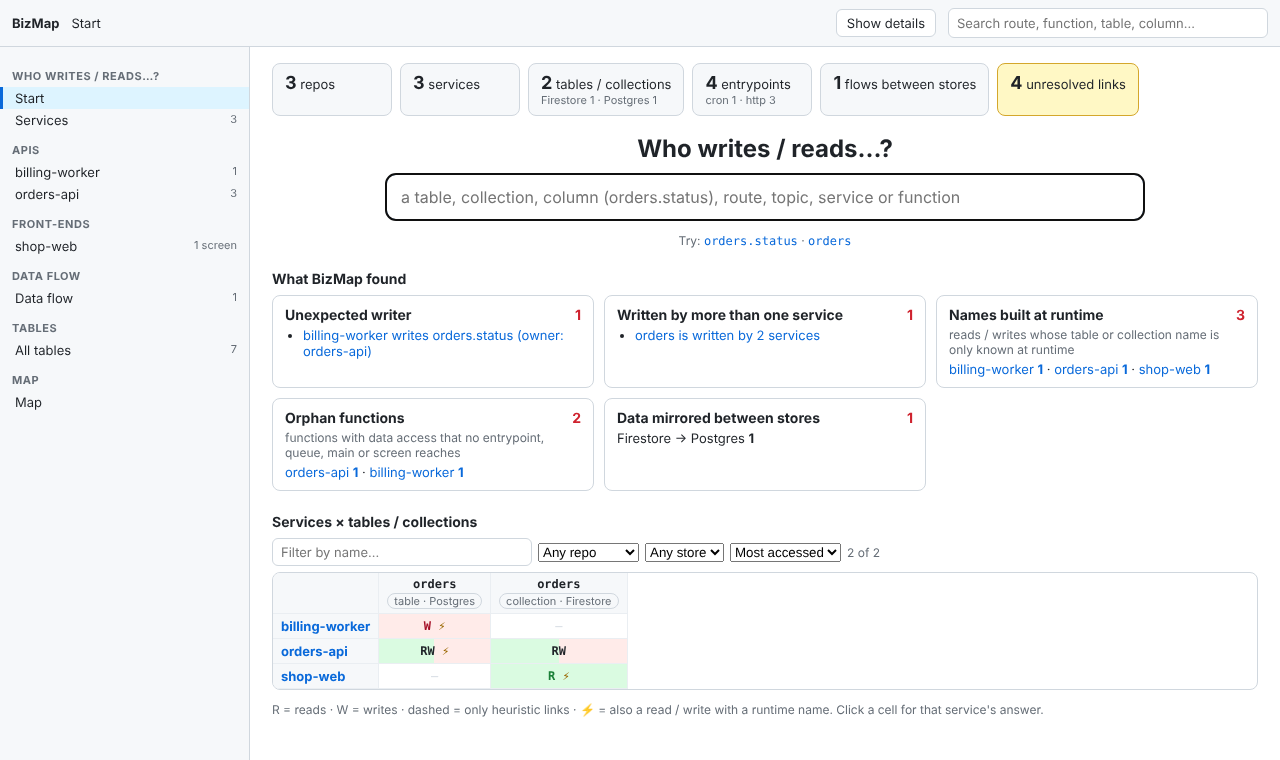
1. Summary strip

Repos · services · tables / collections (by store) · entrypoints (routes,
queue consumers, triggers, cron, main) · flows between stores (feeds
edges whose ends are in different stores) · unresolved links. Each number
opens its list. The unresolved count is always shown, even when it is
0 unresolved: HTTP calls that matched no route, reads / writes whose table
or collection name is built at runtime, and publishes to a topic only known at
runtime. Any of them can change an answer.
2. Who writes / reads X?
The cursor starts in the big search box. It takes a table, a collection, a
column (orders.status), a route (PATCH /orders/:id/status), a topic, a
service or a function, and each suggestion says what it is:
column · Postgres, collection · Firestore, route, topic…

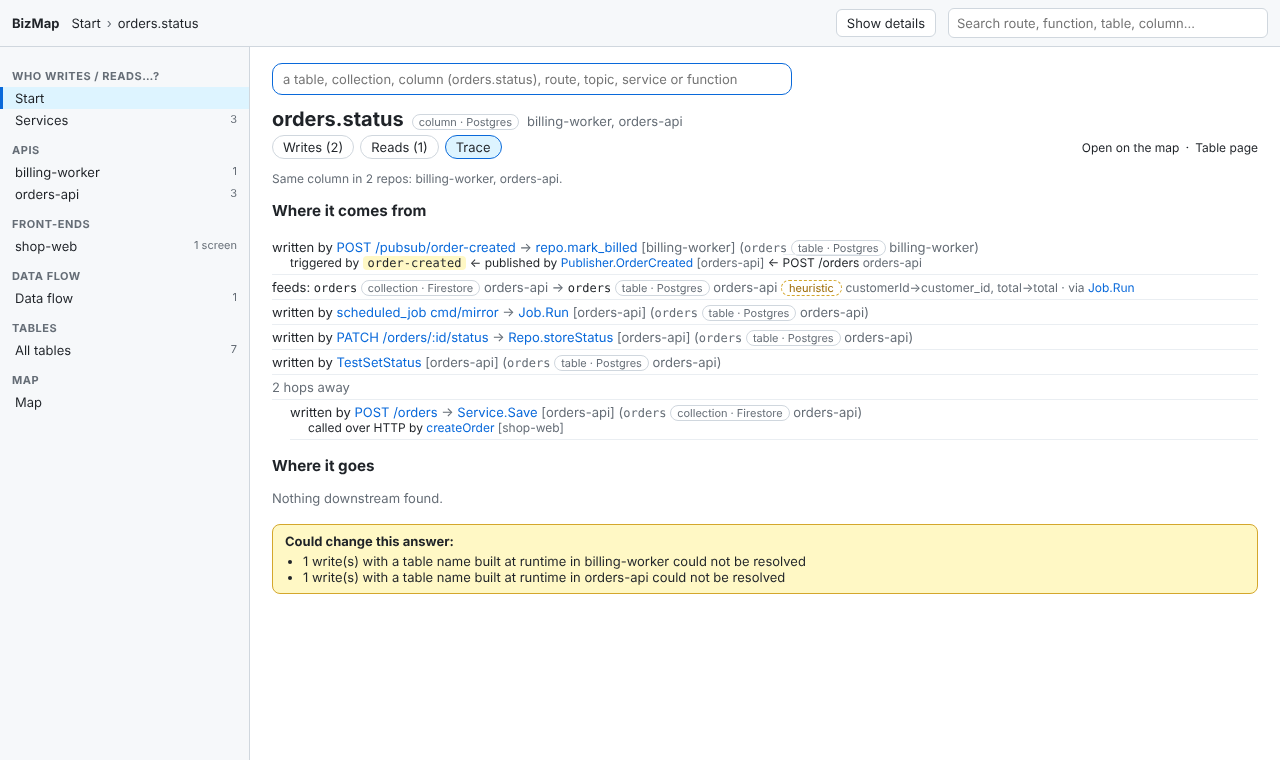
Enter on a table, collection or column opens its answer, with three tabs — Writes, Reads and Trace (where the data comes from and where it goes). A route, function or service opens its page; a topic opens who publishes it, who consumes it and what they write.
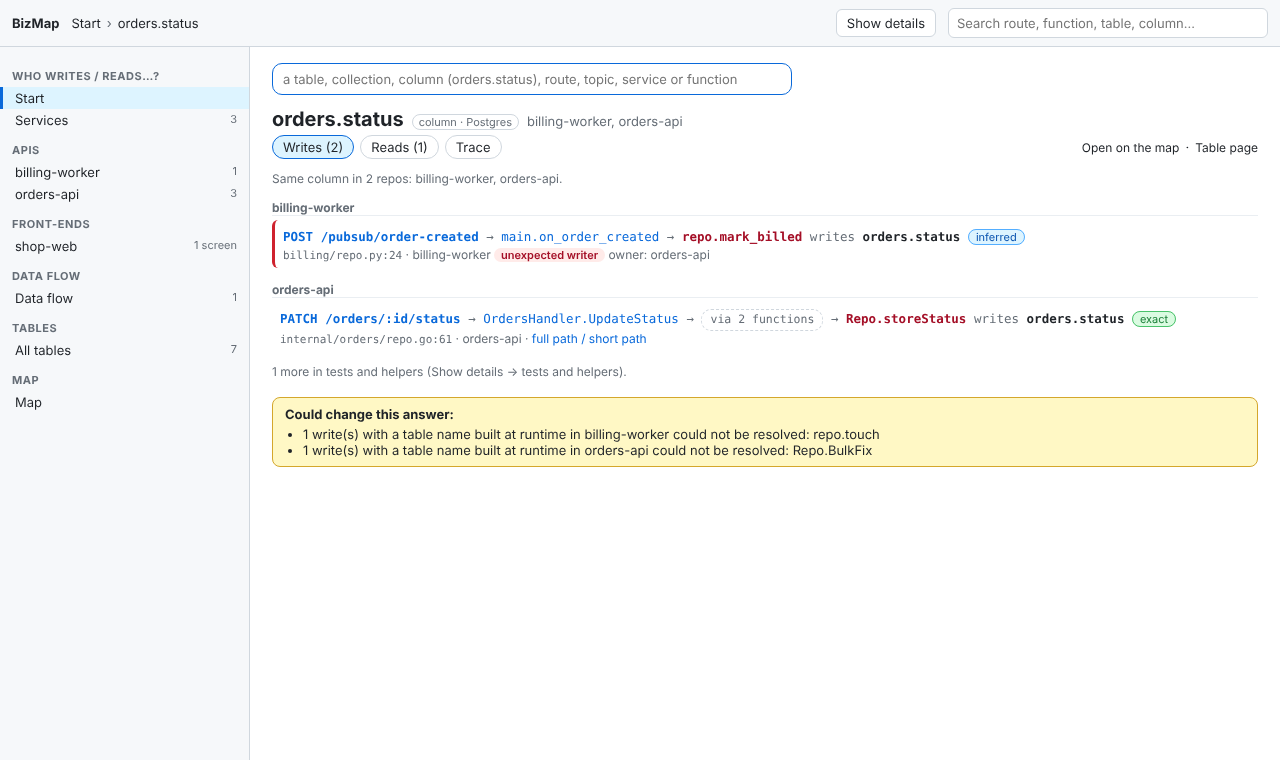
Each line is the same as bizmap who-writes: entrypoint → handler →
(via N functions) → the function that writes, the column(s), the confidence
and file:line, grouped by repo. via N functions (and the full path
link) expands to every function on the way — the page's --path. A writer
from a service that is not the table's owner gets an unexpected writer
badge (see Owner). Every answer ends with
Could change this answer, the same lines the CLI prints.
One engine. The answers are computed in the page by the CLI's query
engine (src/bizmap/query.py) ported line by line to JavaScript
(src/bizmap/export/query.js), on the same graph. They are the same
bizmap.query/v1 JSON bizmap who-writes X --format json prints; the tests
compare both for every table, collection and column of the repro (and a
random sample of a large synthetic graph), and against the CLI itself.
window.__bizmap.answer("orders.status", "writes") returns it in the
browser console.
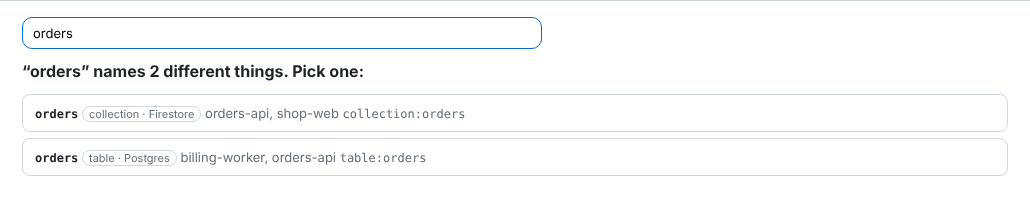
A name that means several things (a Firestore collection and a Postgres
table called orders, the same table in two databases) is never picked
silently: Enter lists the candidates with kind · store · repos.
3. What BizMap found

Each card opens its list (or the answer); a kind with no finding says none.
- Unexpected writer — a table written by a service that is not its owner.
- Written by more than one service — with the count per table.
- Names built at runtime — reads / writes whose table or collection name
is only known at runtime (
doc(db, name, id), an f-string), per service. - Orphan functions — functions with data access that nothing reaches
through calls / triggers from an entrypoint, a queue, a
mainor a UI file. - Data mirrored between stores (Firestore → Postgres…), and written and never read / read and never written, when there are any.
Owner and unexpected writers
The owner of a table is, in this order:
- the one service whose repo declares it in DDL / a migration (the table is
not an
unresolved_relation, and it has typed columns or a.sql/ migration file as evidence); - else the service with strictly more functions writing it than any other;
- else none (no card for that table).
Every other service that writes it is an unexpected writer. It is a hint to look, not a verdict: a worker that owns a status update is fine once you know it is there.
4. Services × tables / collections

Rows are services, columns are tables / collections (kind · store), a cell is R, W or RW (in Portuguese L, E, LE). A dashed cell has only heuristic links; ⚡ marks a service that also reads / writes a table or collection whose name is built at runtime. Click a cell for the answer of that service only; click a column header for the whole answer. Filter by text, repo and store; sort by most accessed, most services or name. Only the top 30 columns are drawn, Show more adds 30 at a time; the header row and the service column stay in place while you scroll.
5. Map
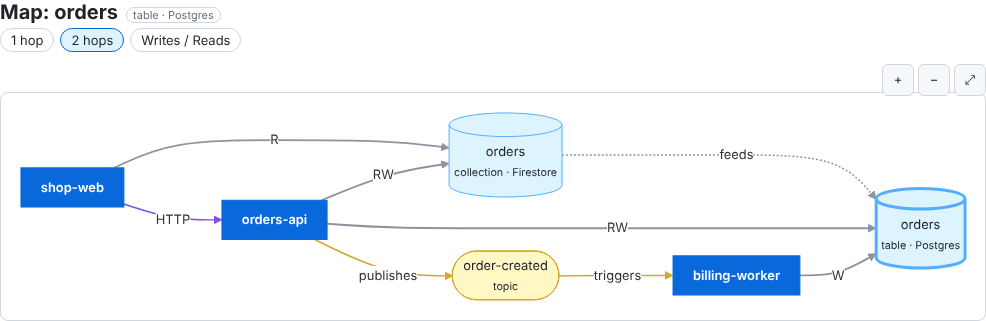
The Map tab never draws the whole system: it asks what to center on (a
table, collection, service or topic) and draws its neighbours 1 or 2 hops
away — services that read / write it, the tables that feed it, the topics
between services (at most 150 nodes). From orders · table, 1 hop shows the
collection that feeds it and the two services that write it; 2 hops adds the
order-created topic and shop-web.
The map is drawn by Mermaid, like the PR comment. It reads left to right:
what writes the centre on the left, what only reads it on the right. With
Show details → intermediate functions, each function sits inside its
service's box under its short name (placeOrder, Repo.ListOrders; the
full name shows on hover). A service that both writes and reads gets one box
on each side. Up to 10 functions per service are shown, the rest as +N
more. Hover a box to light its lines.
A hub table at 2 hops stays readable:
- The outer ring is bundled: more than 4 tables / collections at the last
hop that link only to one box, on the same side, become one box
(140 tables / collections, the first names under it, all of them on
hover).
- The centre's columns are one box (12 columns, a few names per line).
- Lines end on boxes, never on a service's frame: a service's own lines
start from its name box, the first box inside its frame.
6. Show details
By default the page hides intermediate functions (they become via N
functions), columns as map nodes (they stay on the table page), and code in
tests, mocks, fixtures, generated code, scripts/ and tools/. Show
details in the header turns each back on:
| Option | What changes |
|---|---|
| intermediate functions | answers show the full path; the map draws the functions between a service and the centered table |
| columns | the map draws the centered table's columns |
| tests and helpers | answers, cards, matrix and map include tests and helpers (an answer says how many it hides) |
The choice goes in the URL (?d=ict) and follows every link, so a shared link
opens the same view.
Confidence reads the same everywhere: exact, inferred, heuristic (dashed) on answers, cards, matrix cells and map edges.
Large graphs
On a 70k-node graph the page still opens at once: the index read on open holds only the summary, the cards and one small record per table / collection. The graph the engine needs is parsed on the first question, from slices of at most a few MB (on a 107k-node / 628k-edge graph: ~14 MB in all, next to ~32 MB for the rest of the page); copies no query reads are left out. Columns, the map's graph and the findings' full lists are read on first use. Long answers show 100 lines at a time, the matrix 30 columns at a time, suggestions 12. It is still one offline file with no external dependency. A test opens a 40k-node synthetic graph and checks that the start screen draws a bounded number of elements, that search and the matrix page, and that sampled answers still equal the CLI's.
The services overview the page used to open on is now Services
(#/system) in the left navigation.